Affiliate disclosure: Backfire News may earn a commission from qualifying purchases made through links in this article, at no extra cost to you. This does not influence which products we recommend.
A dash cam is one of those products most drivers assume they can live without—until the precise moment they desperately need one.
For most of its life, a dash cam sits quietly behind the rearview mirror. It starts when the vehicle starts, records the road, fills its memory card and then records over the oldest footage. On a normal commute, it may capture nothing more important than traffic, construction zones and the occasional driver doing something ridiculous.
But when something goes wrong, that unremarkable little camera can suddenly become one of the most valuable pieces of equipment in the vehicle.
We know that from experience.
We have been involved in accidents in which the person responsible did not give the insurance company an accurate account of what happened. In some cases, the other party disputed important details. In others, the person simply would not communicate with the insurer and accept liability.
Without independent evidence, even a straightforward accident can turn into a prolonged argument. The drivers may tell different stories. Witnesses may leave before anyone collects their information. Memories can become less precise, physical evidence may be inconclusive and the police report may not definitively assign fault.
Meanwhile, the damaged vehicle still needs to be repaired.
That can leave the innocent driver stuck waiting while insurance companies investigate, request statements and attempt to contact someone who may have little interest in cooperating.
Our dash-cam footage changed that equation.
Instead of asking an insurance adjuster to choose between two competing versions of an accident, we could provide a video showing what happened. The footage helped answer the liability question, reduced the importance of the other driver’s changing or incomplete account and streamlined the process of getting our vehicles repaired.
That is the real reason to own a dash cam.
It is not primarily about collecting entertaining clips for social media. It is not about catching meteorites, spectacular crashes or somebody transporting a mattress in a wildly inadvisable manner—although dash cams certainly record those things too.
A dash cam is an impartial witness that travels with you.
When two drivers tell two different stories
After a collision, the facts may seem obvious to you. You know which vehicle entered the intersection against the light. You know that you were established in your lane. You know that the other driver pulled out, merged into you, crossed the center line or stopped abruptly after cutting in front of your car.
The other driver, however, may tell a completely different story.
Sometimes that is a deliberate attempt to avoid responsibility. Sometimes it is panic or embarrassment. Sometimes people genuinely perceive a fast-moving event differently, particularly after the shock of a collision. Whatever the reason, the insurance company may be presented with two incompatible accounts and little independent evidence.
A dash cam cannot prevent someone from lying. It can make the lie much easier to disprove.
Video can establish your lane position, the direction of travel, the sequence of events and the behavior of nearby traffic. Depending on the camera’s position, field of view and image quality, it may also capture traffic signals, signs, lane markings, vehicle movements and license plates.
A two-channel system adds a rear camera, giving the driver a second perspective. That can be especially useful in a rear-end accident, a sideswipe, a disputed lane change or any incident in which the other vehicle approaches from behind.
The footage does not need to look cinematic. It needs to be usable.
That distinction will be central to this series.
A camera can claim 4K resolution and still struggle to capture the one detail you need. Motion blur, windshield reflections, darkness, headlight glare, rain, compression and the relative speed of two vehicles can all affect whether a plate or road sign remains readable.
Resolution matters, but it is only one part of the job.
A dash cam can shorten the path from accident to repair
Even if the facts eventually work in your favor, the time required to establish those facts matters.
A vehicle may be sitting damaged or undriveable while an insurer waits for the other party to provide a statement. The owner may be dealing with a deductible, rental-car limits, parts delays, repair scheduling and the ordinary disruption that follows a collision.
Clear footage can give an adjuster something concrete to evaluate early in the process. It can help show the impact itself and the events immediately preceding it, reducing the amount of uncertainty surrounding the claim.
That does not mean a dash cam automatically decides fault. Insurers, law enforcement and courts still evaluate evidence within the relevant legal and policy framework. A camera’s view can also be incomplete, and footage may contain information that is unfavorable to the camera owner.
Nevertheless, a clear recording can turn an abstract argument into a visible sequence of events. In our own accidents, that helped move the liability question forward and get our cars repaired.
That alone is enough to justify installing one.
The protection continues after you park
A substantial number of vehicle incidents happen when the owner is nowhere near the car.
Someone can strike your vehicle in a parking lot and leave. A shopping cart can roll into a door. A vehicle can be vandalized, damaged during an attempted theft or hit while parked on the street.
Without a camera, the owner may return to find damage with no explanation and no responsible party.
Parking surveillance is intended to extend dash-cam protection beyond the drive itself. Depending on the system, a camera may use impact detection, motion detection, time-lapse recording, low-power monitoring or radar to watch the area around the vehicle.
Parking mode is also where specifications and real-world performance can diverge sharply.
The camera needs a power source after the ignition is switched off, normally through a hardwiring kit, an OBD-II power connection or a dedicated dash-cam battery. It also needs to avoid draining the vehicle’s battery. If the system wakes too often, it may consume unnecessary power and fill the memory card with useless clips. If it is not sensitive enough—or wakes too slowly—it may miss the incident.
A manufacturer can list parking mode on a feature sheet. Our testing will examine whether that feature is practical to install, configure and trust.
Reliability matters more than a spectacular sample clip
The most important characteristic of a dash cam may be the hardest one to demonstrate in a short review: reliability.
A dash cam has to work every time the vehicle is driven. It must power on, recognize its memory card and record without requiring the driver to think about it. It has to manage heat, cold, vibration and repeated power cycles. It needs to protect important event files without allowing locked recordings to consume all available storage.
Most importantly, the driver needs to be confident that the footage exists before an accident occurs.
A camera that produces an excellent image 95 percent of the time may still be a bad dash cam if the missing five percent includes the one drive that matters. The best system is not necessarily the camera with the longest feature list. It may be the one that installs cleanly, operates predictably and lets the owner retrieve an important clip without a fight.
That is why this will be a multi-week test instead of a quick unboxing.
The Backfire News 4K dash-cam test
We have three dash-camera systems on hand:
- Vueroid S1 4K Infinite
- GKU D600 Pro Max 4K
- Thinkware U3000 4K UHD/QHD two-channel bundle
All three arrived well packaged, and all three included installation equipment. We will install them in the order in which we received them.
Each camera will receive one full week of real-world use and its own standalone review. Once all three individual reviews are complete, we will bring the results together and grade the cameras against one another.
The comparison will cover more than advertised resolution. We will evaluate:
- Packaging and included equipment
- Installation difficulty
- Mounting options and cable routing
- Initial setup
- App pairing and general software experience
- Daytime video
- Nighttime and low-light video
- Front and rear coverage, where applicable
- License-plate and road-sign legibility
- Exposure in bright sunlight, deep shadows and headlight glare
- GPS, Wi-Fi and file-transfer performance
- Event recording and file protection
- Parking-surveillance options
- Memory-card management
- Voice controls, alerts and physical controls
- Heat management and everyday reliability
- The speed and simplicity of retrieving and sharing footage
- Overall value and the likelihood that we would trust the camera in our own vehicles
One week cannot simulate years of ownership, and we will not pretend that it can. It is long enough, however, to move beyond first impressions and identify many of the frustrations that appear during ordinary use.
We will also separate manufacturer claims from our findings. What follows is an introduction to each camera based on how its manufacturer describes and advertises it. These are the features we have been told to expect—not conclusions we have reached.
Vueroid S1 4K Infinite
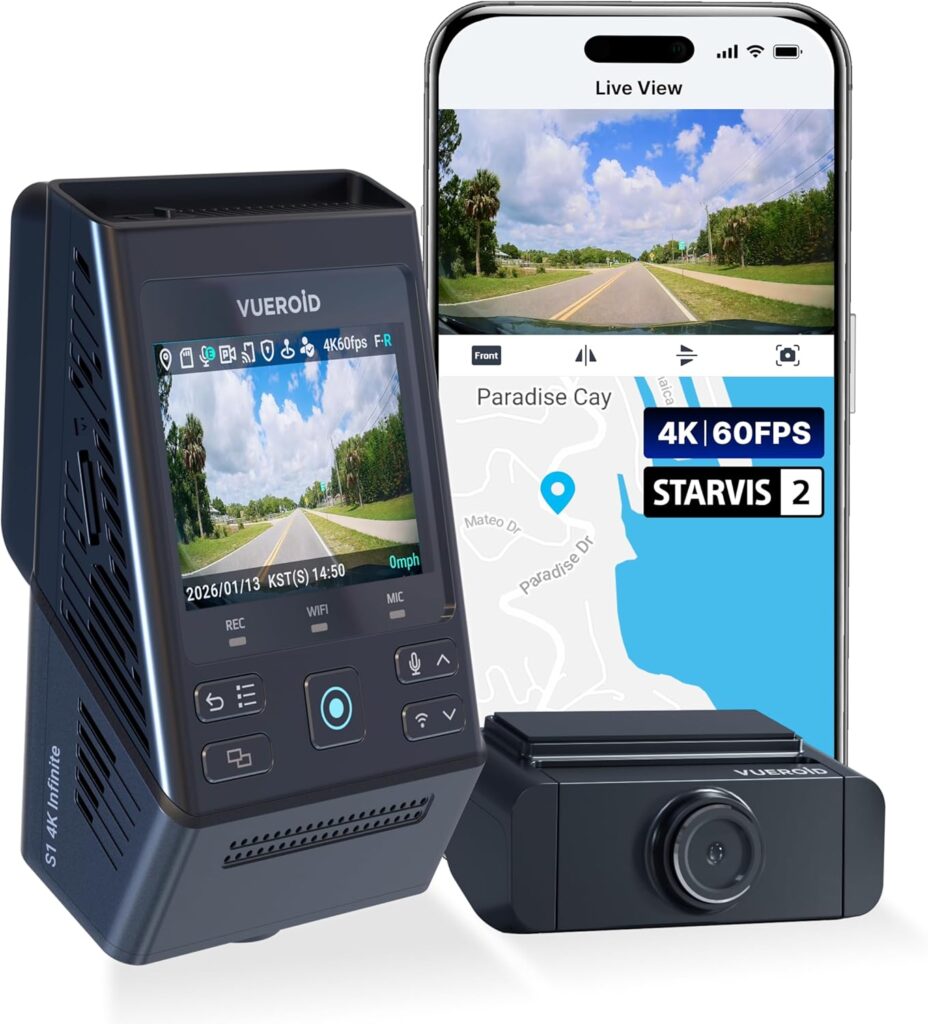
Vueroid presents the S1 4K Infinite as a premium dash-cam platform focused heavily on image quality, license-plate capture and AI-assisted footage processing.
In its two-channel configuration, Vueroid lists a Sony STARVIS 2 sensor, a Novatek system-on-chip and front-and-rear recording at up to 4K and QHD resolution. The company specifies a maximum front recording mode of 4K at 60 frames per second, with the rear camera recording QHD at 30 fps. It lists fields of view of 151 degrees in front and 160 degrees at the rear, along with a 2.3-inch button-operated display, built-in GPS and both 2.4GHz and 5GHz Wi-Fi. \
Read: Vueroid S1 4K Infinite specifications
The numbers are noteworthy, particularly the advertised ability to record 4K footage at 60 fps. A higher frame rate can potentially help a camera preserve detail during rapid movement, although resolution, exposure time, processing and available light remain significant factors. Whether that theoretical advantage produces more useful evidence is something we will examine.
The S1’s most distinctive advertised feature is what Vueroid calls Infinite Plate Capture Mode. The company says its AI-based technology can process pixelated plate images and produce clearer still images intended to recover useful identifying information.
Vueroid also advertises AI license-plate restoration through its Vueroid Hub software, along with automatic privacy protection. That combination raises interesting practical questions. Can the software actually recover useful information from a plate that is difficult to read in the original video? How much intervention is required? Does the processing work consistently across day, night and moving footage? And can an ordinary owner use it quickly after an accident?
Those questions will be part of the S1 review.
The manufacturer also promotes a proprietary image-signal-processing system and a Premium Night Vision Mode. Those features are intended to improve footage in difficult lighting, where a dash cam may need to expose a dark roadway without allowing approaching headlights or reflective license plates to become unreadable.
On the storage side, Vueroid advertises its patented TFF system—short for “File Fragmentation Free”—as a format-free and crash-resistant approach to managing recordings. Dash cams constantly write and overwrite large numbers of video files, so storage integrity is not a minor concern. We will watch for card errors, recording gaps, file corruption and any need for routine formatting.
The S1 also advertises several parking options: impact detection, motion recording, time-lapse recording, an extreme low-power energy-saving mode and what Vueroid calls Durashift Parking Mode. A configurable recording-off zone is intended to prevent unnecessary parking recordings in selected locations, while battery cutoff settings are designed to protect the vehicle’s battery.
Vueroid says the energy-saving parking mode can wake and begin recording less than one second after detecting an impact. It also lists an automatic emergency lock for event footage and direct file transfer through USB-C.
According to the manufacturer, the camera is designed to operate from -4 to 149 degrees Fahrenheit, with a listed storage range reaching 158 degrees. That will matter to anyone leaving the system mounted through hot summers or cold winters.
On paper, the S1 appears to be the most image-processing-focused entrant in the group. Its test will center on whether the AI plate features, 4K recording, high-frame-rate capability, parking functions and storage system make the camera meaningfully better at preserving evidence—or whether they add complexity without changing the result.
GKU D600 Pro Max 4K
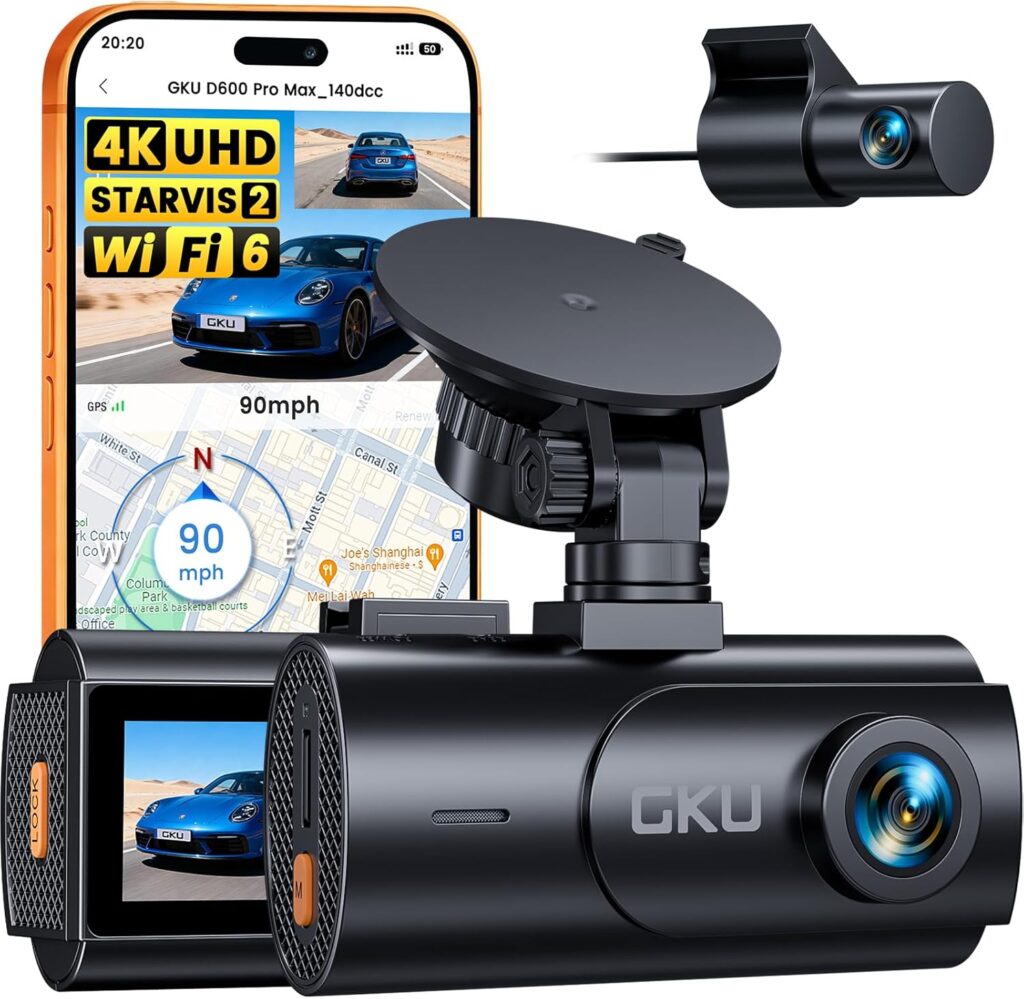
GKU positions the D600 Pro Max as the flagship member of its D600 series and as a comparatively accessible two-channel camera aimed at daily drivers, night drivers and people who want a broad list of features without moving into the highest price tier.
The D600 Pro Max combines a 4K front camera with a 1080p rear camera. GKU specifies front recording at 3840 by 2160 pixels and 30 fps, with rear footage recorded at 1920 by 1080. The front camera uses a Sony STARVIS 2 IMX675 image sensor, according to the company, along with wide dynamic range processing and what GKU calls Super Night Vision.
Read: GKU D600 Pro Max product information
GKU advertises the imaging system as being able to balance bright and dark areas in difficult conditions such as night driving, tunnels, parking structures, glare and poor weather. That is an important claim because nighttime footage is one of the clearest dividing lines between dash cams.
A camera may produce a bright nighttime image while still losing the details that matter. Noise reduction can smear fine information, while reflective plates can become white rectangles under headlights. We will judge the D600 Pro Max by the usable details in the file, not simply by whether the picture looks bright on its display.
The GKU includes a 2.99-inch IPS screen. That makes it different from systems that depend almost entirely on a phone for aiming the camera, changing settings and confirming operation. A physical display can make initial alignment easier and provide an immediate status check, although its menus and controls still need to be intuitive.
The D600 Pro Max also advertises built-in GPS, recording route, vehicle speed and location data. GKU says that footage and associated trip information can be viewed on a computer using its GPS Player software.
For wireless access, GKU lists dual-band 5.8GHz and 2.4GHz Wi-Fi 6, with advertised transfer speeds of up to 20 megabytes per second through the GKU GO app. The app is intended to let the user preview footage, replay recordings, change settings and download clips without removing the memory card.
That will be an especially important part of the test. After an accident, a fast camera paired with a confusing app is not particularly helpful. We will see how easily the phone connects, how quickly footage appears, whether large 4K clips transfer reliably and how many steps it takes to save a shareable copy.
The GKU also includes voice control. According to the manufacturer, the driver can use spoken commands to perform functions such as saving footage or taking a snapshot. In theory, that is safer and faster than searching for a small button while driving. In practice, voice controls need to recognize commands consistently inside a moving vehicle with music, passengers, road noise and climate-control fans running.
The company advertises seamless loop recording and a G-sensor that locks an event file after detecting a collision, impact or unusual vibration. The driver can also manually protect footage using a physical lock button. The system supports memory cards up to 512GB, although GKU states that the D600 Pro Max package does not include a card.
With a separately sold hardwire kit, the D600 Pro Max offers three parking-surveillance options: time-lapse recording, collision detection and pre-recording. GKU says its buffered parking feature can capture between 30 and 60 seconds before and after a supported incident.
That pre-event recording could be particularly valuable. An impact-only clip that begins after contact may show the aftermath while missing the approach. Buffered recording is meant to preserve the events leading up to the trigger.
The D600 Pro Max uses a supercapacitor rather than a conventional internal battery. Supercapacitors are commonly used in dash cams because they are better suited to repeated heat exposure and do not present the same swelling and degradation concerns as lithium-ion batteries left against a hot windshield.
GKU supplies both suction-cup and adhesive mounting options. That gives owners a choice between an easily removable installation and a more permanent, lower-profile position. The company advertises a 12-month warranty that can be extended to 24 months.
The GKU’s pitch is straightforward: 4K front recording, rear coverage, STARVIS 2 night imaging, GPS, fast Wi-Fi, voice control, buffered parking protection and a physical display at a relatively approachable price. Our review will determine how well those features work together and where compromises were made.
Thinkware U3000 4K UHD/QHD two-channel bundle
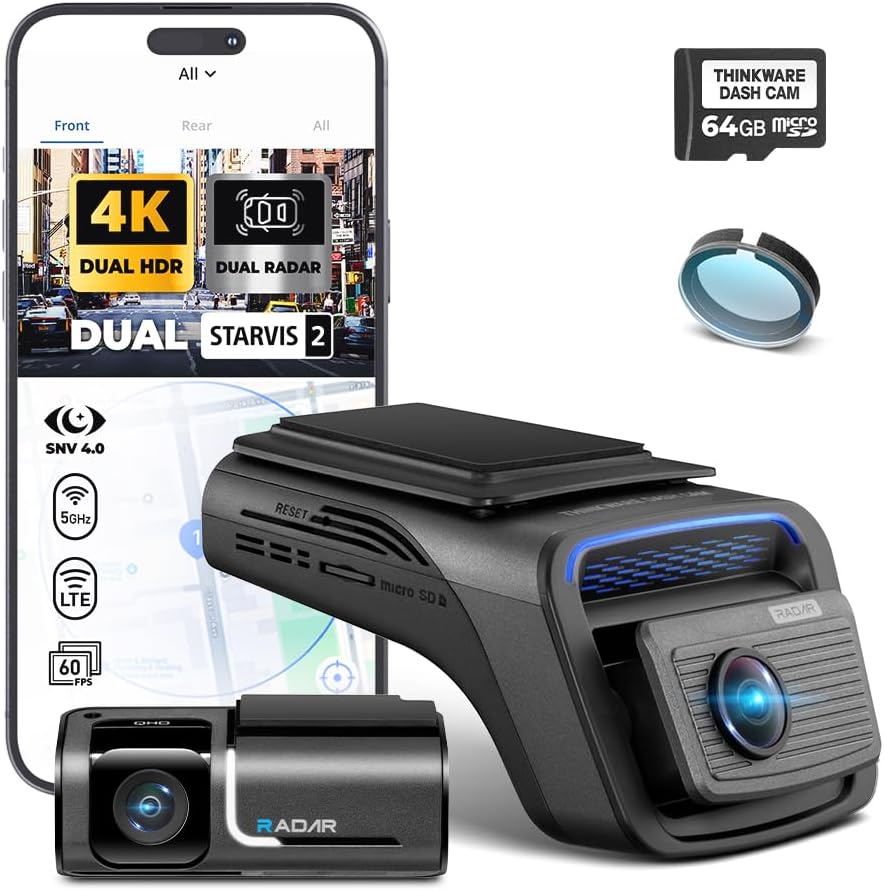
The Thinkware U3000 enters this comparison as an established premium system with an unusually extensive collection of driving and parking-surveillance features.
The two-channel package combines a 4K front camera with a QHD rear camera. Thinkware lists front recording at 3840 by 2160 and 30 fps, with the option to record the front at 2560 by 1440 and 60 fps. The front unit uses an 8.4-megapixel Sony STARVIS 2 IMX678 sensor and has a listed 152-degree diagonal viewing angle.
Read: Thinkware U3000 specifications
Thinkware’s Super Night Vision 4.0 is designed to use the STARVIS 2 sensor’s high sensitivity and low-noise capabilities to improve recording in dark conditions. The company also advertises wide dynamic range, smart automatic exposure and dewarping technology.
Smart exposure is intended to help the camera respond to glare from sunlight or headlights, while dewarping attempts to reduce the curved, distorted appearance produced by a very wide lens. These features matter because a broad field of view is useful only if the important objects within it retain enough shape and detail to identify.
The U3000 does not rely on a built-in display. Setup, configuration and footage access are handled through Thinkware’s software. It includes Bluetooth and dual-band 2.4GHz/5GHz Wi-Fi, with the Thinkware Dash Cam Link app used for pairing, settings, playback and downloads.
The system also supports Thinkware Connected features when the camera has access to an internet-connected hotspot or Wi-Fi network. Advertised capabilities include remote live view, vehicle location, driving history, impact notifications, battery-voltage information and images showing the most recent parking location. Some connected functions require additional connectivity and may use mobile data.
Thinkware additionally advertises emergency messaging. A sufficiently strong impact can trigger a notification through Thinkware Connected and send an emergency message to a registered contact. The driver can also hold the recording button to send an emergency message manually, provided the necessary connected setup is active.
The U3000’s signature feature may be its built-in radar parking mode.
Rather than continuously running the full camera system, the U3000 can use front and rear radar to watch for movement while operating in a low-power state. When the system detects motion within the selected range, it wakes the cameras and records a 20-second clip.
The goal is to extend parking-surveillance time while still preparing the cameras to capture an approaching person or vehicle. Radar parking mode requires a hardwired or compatible OBD-II power connection.
Thinkware also supplies more conventional parking modes. Motion-and-impact detection records 10 seconds before and 10 seconds after a trigger. Time-lapse mode records at two frames per second to preserve a longer period while reducing storage and power use. Energy-saving mode waits for an impact before recording, while Smart Parking Mode changes behavior at high interior temperatures to protect the hardware.
These modes create many configuration possibilities, but they also create more opportunities for confusion. We will examine how clearly the app explains each option, how the system transitions between driving and parking operation and whether the default behavior makes sense.
The U3000 also advertises advanced driver-assistance alerts. These include forward-collision warnings, lane-departure warnings and an alert when the vehicle ahead begins moving after a stop. Built-in GPS enables speed and red-light-camera alerts where the relevant database and feature are supported.
A dash cam is not a substitute for the vehicle’s factory safety systems, and we will treat these alerts as secondary features. Their value depends on calibration, consistency and whether they provide useful information without becoming a distraction.
Thinkware uses H.265 HEVC compression to reduce video-file sizes and supports microSD cards up to 512GB. The U3000 is built around a supercapacitor and includes thermal protection and anti-file-corruption measures. Thinkware lists an operating range from 14 to 140 degrees Fahrenheit and a storage range from -4 to 158 degrees.
The two-channel package is intended to be a comprehensive system rather than simply a camera. Its strongest advertised arguments are its high-resolution front and rear coverage, STARVIS 2 imaging, extensive parking options, built-in radar, connected services and mature feature set.
Its challenge will be making all that technology approachable. We will be looking closely at installation, app pairing, menus, alerts, file retrieval and whether the complexity produces a more useful and reliable ownership experience.
Three different approaches to the same problem
Although these cameras all occupy the same basic category, their advertised strengths are different.
Vueroid emphasizes high-frame-rate 4K recording, AI-assisted license-plate restoration, proprietary image processing and advanced file management.
GKU emphasizes value, a physical display, 4K front recording, Wi-Fi 6 file transfers, voice control and an extensive everyday feature set.
Thinkware emphasizes premium front-and-rear imaging, radar-based parking surveillance, connected services and a larger collection of driver-assistance and vehicle-monitoring functions.
A specification sheet cannot tell us which approach works best.
The winner will not automatically be the camera with the highest listed resolution, the most expensive hardware or the longest menu of features. It will be the system that most convincingly performs the core job: recording useful evidence, preserving it reliably and letting the owner retrieve it when it matters.
Our disclosure
All three dash cams were offered to Backfire News by their respective manufacturers. There was no payment, incentive or requirement to produce a review, favorable or otherwise. The manufacturers did not impose an expectation that the products would receive editorial coverage, and they will not control our findings.
This introductory article describes the products using claims and specifications published by the manufacturers. Those claims are not our conclusions.
Each camera will now receive its own one-week standalone review. After all three have been installed, driven and evaluated, we will grade them head-to-head for ease of use, features, image quality, reliability, functionality, installation, software experience, parking protection and overall value.
Because the point of a dash cam is not what it promises to do on an ordinary day.
The point is whether it works on the worst one.
About the Author